


Code on the Go (CoGo™) was updated on October 6, 2026 to 26.41.
IMPORTANT: Migrate Existing Projects to Use the New Toolchain
In release 26.38, we upgraded the CoGo toolchain. Learn about the new features.
If you install today’s release (26.41) without migrating projects built in 26.37 or earlier, those projects may fail to build. The steps to migrate projects are covered in this migration guide.
- If you already migrated your projects, no action is needed.
- If you haven’t migrated your projects, follow the steps in this migration guide. This video explains the migration procedure.
If you do not want to migrate your projects at this time, release 26.37 is still available on the download page. It is the last release that uses the old toolchain. None of the new features introduced in 26.38 and beyond are supported. We strongly recommend that you migrate your existing projects soon.
NEW: Quick Build updates a running app 4x faster
Quick Build is an experimental feature that reloads your saved changes into the running app in just a few seconds, without a full rebuild or reinstall. Quick Build can be more than four times faster than Quick Run (the green triangle) when making an edit to a running app, with fewer repetitive Android prompts to answer. (The actual speed varies based on the type of edit and phone specifications.)
Comparing Quick Build vs Quick Run speed for changing a running app on a Samsung Galaxy A06.

Requirements
You must enable the experimental features flag in Code on the Go and restart the app, and your project must meet the following requirements:
- The project must produce an Android app with a launchable Activity. Library and plugin projects do not work with Quick Build.
- The project must run in a single process. Quick Build cannot reload an app that starts extra processes.
- The
debugvariant must be selected. If areleasevariant is selected, Quick Build will ask you to change to adebugvariant.
In addition, Quick Build requires more device memory and storage than a normal build because it keeps compiler tools loaded in memory between edits.
Use Quick Build
To use Quick Build, follow these steps:
- Create or open a project that meets these requirements.
- To create the proxy app, tap Quick Build. This creates the proxy app, and will take about as much time as the first build using the standard option.
- When the build is finished, install and launch the app. CoGo installs the proxy app, which looks and acts like the real app with the same app ID, permissions, and resources. If a regular (non-proxy) version of your app is already installed, CoGo asks before replacing it.
- Edit the app. As you edit, each save is compiled and pushed into the running app.
- When you’re ready to build the app again, tap Quick Build. The updated app will restart with your changes within seconds. Apps with a background service may restart fully. Status messages at the bottom of the editor track the progress of the build.
Other Fixes and Improvements
- A new feature to replace text throughout a project is available. You can review every instance of matching text before applying changes, choose which instances to replace, and immediately undo all applied changes, To use this feature, tap the magnifying glass on the slider and select Replace in project.
Left: Identifying text to replace.
Right: Search results show all files and locations where the text was found. After reviewing the changes and clearing any selections you don’t want to change, tap Replace to change all selected items.

- A new, easier-to-navigate add-ons directory is available at addons.appdevforall.org. You can search, filter, and use tags to locate the add-ons that meet your needs.
- Autocomplete is now available in Python.
- In Kotlin, the Format code button now works correctly. (Long-press anywhere in the editor window to display the toolbar. The Format code button is the next-to-last item on the right, immediately next to the help button.)
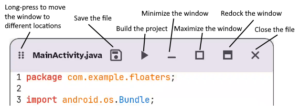
- In the undocked performance monitor and undocked editor windows, the icon to re-dock the window has been updated.
Window management options for an undocked file
- A bug that displayed duplicate versions of a single saved project is fixed.
- The navigation rail can now contain an unlimited number of items.
- Other fixes including resolving the error
KotlinIllegalArgumentExceptionWithAttachments.
Introducing Knowledge to Go (K2Go™)
App Dev for All is proud to announce of Knowledge to Go (K2Go™), a free and open-source Android application that transforms virtually any Android phone (including older 32-bit devices) into an offline content server capable of sharing educational, medical, and technical resources with anyone nearby over local Wi-Fi. No internet access, specialty hardware, or technical expertise is required.
K2Go can be cloned directly to another Android phone, empowering people to bring the K2Go content (including Code on the Go) back to their homes and communities on their existing devices. Learn more at appdevforall.org/knowledgetogo.
Support Our Work
Thank you for being a part of our community!
App Dev for All is a philanthropic venture driven by a simple mission: to provide powerful, accessible tools to developers everywhere. Because of this commitment, our software is and always will be free and open source.
To maintain our independence, we rely entirely on private funding and the generosity of users like you. If our software adds value to your workflow, please consider supporting our mission. Your contributions directly fund ongoing development, maintenance, and future innovations.
Let Us Know What You Think
If you have any problems or suggestions, please let us know! You can reach us the following ways:
- Post to GitHub Discussions
- Create a GitHub issue
- In the app, tap the Feedback button to create an email that includes a screenshot
- Send us email
- For announcements and general CoGo chat, visit our Telegram community